About This Application
CallFinder is designed to find, retrieve and playback recordings from your legacy recording systems.
CallFinder is useful when you need to keep recordings for lengthy periods of time and you need to find and play them back quickly.
CallFinder is more than just a playback station.
Most clients keep recordings for legal reasons and also have to keep their old infrastructure maintained.
CallFinder helps reduce the infrastructure needed to maintain the ability to playback to a single virtual server.
CallFinder is also available in the cloud so speak to our business partners for more details about these savings.
CallFinder's developers have over 20 years combined experience in the telecommunications and information technology industries.
Highly certified in systems and software engineering and well respected by their peers.
Supported vendor product sets include Telstrat, Asterisk, Genesys Pure Connect, Verint, Avaya Contact Recorder, Avaya IP Office, Integrics and NICE.
User Guide
CallFinder is super simple to use.
Finding Recordings
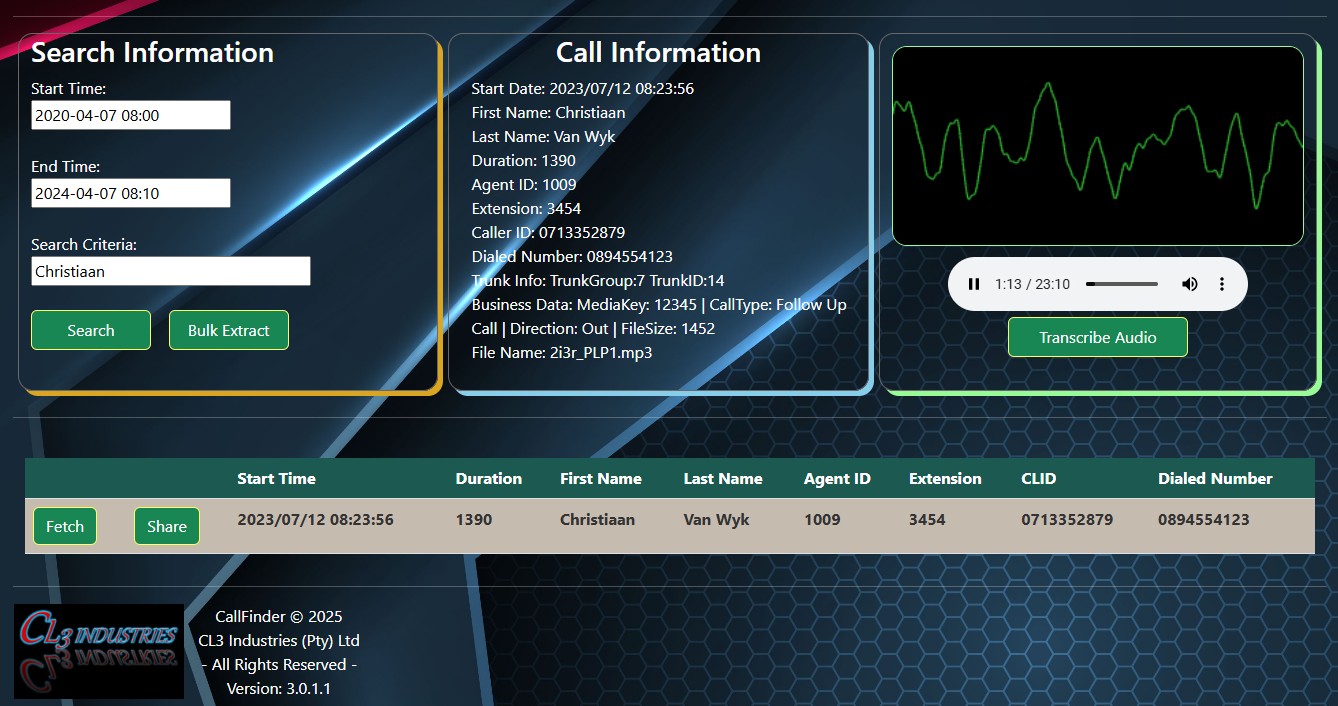
Start by selecting your sart and end dates. Then enter your search criteria such as the extension number, agent ID, First or Last Names or any customised business data references that exist in the database.
It's okay if you don't want to enter any criteria, we'll bring back the records we can find based on the date inputs.
Click the Search button and our search engine will find the records matching your criteria and return the results to your screen.
Listening to the call
To load the player click on the Fetch button for the row in the results that you want to retrieve.
The media we provide is easily distributable, of a small size and can be played on most media players and browsers.
Depending on your user profile and the device you are using; play, pause, seek, adjust volume, mute and download functions are available once the player has loaded the audio.
Sharing Recordings
Profile depenency ensures only authorised persons may download or share a recording.
The Share button prepares the recording for sharing and collects information relating to the request before linking it to the specific Ombudman's profile.
Mobile devices will not be able to download the media and some devices do not allow the media to start playing automatically.